Teaching an AI to Develop My RAW Photos: A Self-Hosted Linux Pipeline
I wanted to answer a specific question: could an AI agent do the boring, careful parts of my photography workflow — the parts I actually skip because they take too long?
Not “make my photos look good” in the Instagram-filter sense. I mean the tedious, correct-but-thankless work: pulling the right RAW off my server, applying the exact lens-correction data for the exact lens I used, denoising only the frames that need it, keeping the EXIF intact, filing everything under the right date, and getting a print onto photo paper without fighting a driver. The stuff a careful darkroom tech would do and a busy human never quite gets around to.
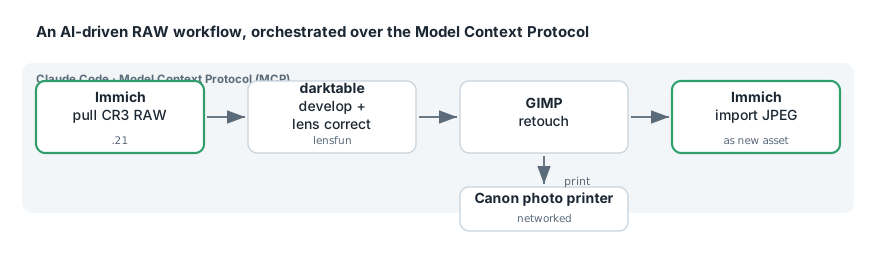
So I built it. A local, self-hosted pipeline where Claude Code can reach into my Immich library, pull original Canon CR3 RAW files, develop them in darktable with camera- and lens-specific corrections, retouch in GIMP, print on a networked Canon photo printer, and push finished JPEGs back into Immich as new assets — all driven through the Model Context Protocol (MCP).
Two Ways My Self-Hosted Immich Broke — and Neither Was Corrupt Data
I self-host Immich for my photo library, and it has broken on me in two completely different ways — both instructive, and both sharing a reassuring punchline: the photos were always fine. The failures were in the plumbing around them, not the data.
The first was a storage problem wearing a data-corruption costume: thousands of “unsupported image format” and “input file is missing” errors for files that were perfectly healthy. The second was a self-inflicted supply-chain problem: an overnight auto-update yanked the database extension out from under the server and put it in a boot loop. This post is both stories, because together they’re a decent field guide to operating Immich in a homelab.