Teaching an AI to Develop My RAW Photos: A Self-Hosted Linux Pipeline
I wanted to answer a specific question: could an AI agent do the boring, careful parts of my photography workflow — the parts I actually skip because they take too long?
Not “make my photos look good” in the Instagram-filter sense. I mean the tedious, correct-but-thankless work: pulling the right RAW off my server, applying the exact lens-correction data for the exact lens I used, denoising only the frames that need it, keeping the EXIF intact, filing everything under the right date, and getting a print onto photo paper without fighting a driver. The stuff a careful darkroom tech would do and a busy human never quite gets around to.
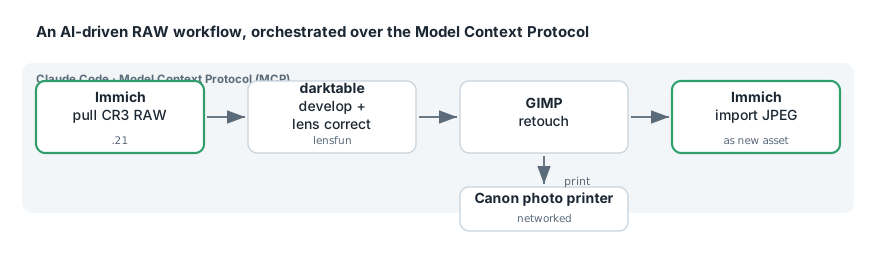
So I built it. A local, self-hosted pipeline where Claude Code can reach into my Immich library, pull original Canon CR3 RAW files, develop them in darktable with camera- and lens-specific corrections, retouch in GIMP, print on a networked Canon photo printer, and push finished JPEGs back into Immich as new assets — all driven through the Model Context Protocol (MCP).
A Valid TLS Cert for a LAN-Only Home Assistant: Traefik, DNS-01, and Split-Horizon DNS
Here’s a puzzle that trips up a lot of homelabbers: you want a publicly-trusted TLS certificate for a service that is only ever reachable on your LAN. No port forwarding, no exposing the box to the internet — but also no browser warnings, no self-signed-cert clicking-through, and no private CA to install on every device.
The specific thing that forced my hand: I wanted to connect Claude.ai’s remote MCP connector to my Home Assistant instance, and that connector flatly refuses plain HTTP. It demands a valid https:// endpoint. My HA is a sealed Green appliance at 192.168.1.18:8123, LAN-only, and I had no intention of exposing it to the world.
The answer is a nice combination of three ideas — a Let’s Encrypt DNS-01 challenge, a wildcard certificate, and split-horizon DNS — wired together with Traefik. This post is the worked example.
Letting Claude Read My Firewall: an OPNsense MCP Server, and What It Found on My Network
I gave Claude a read-only window into my firewall. Not “pasted some logs into a chat” — an actual Model Context Protocol server wrapping the OPNsense API, so Claude Code could call leasesSearchLease, dnsReverseLookup, and dozens of other firewall functions on demand. Then I pointed it at a simple question — what is actually on my network, and where does it all phone home? — and got a genuinely uncomfortable answer.
This post is two things: how to stand up an OPNsense MCP server in Docker safely, and the little network-forensics session it enabled, which is the real reason to build one.