Teaching an AI to Develop My RAW Photos: A Self-Hosted Linux Pipeline
I wanted to answer a specific question: could an AI agent do the boring, careful parts of my photography workflow — the parts I actually skip because they take too long?
Not “make my photos look good” in the Instagram-filter sense. I mean the tedious, correct-but-thankless work: pulling the right RAW off my server, applying the exact lens-correction data for the exact lens I used, denoising only the frames that need it, keeping the EXIF intact, filing everything under the right date, and getting a print onto photo paper without fighting a driver. The stuff a careful darkroom tech would do and a busy human never quite gets around to.
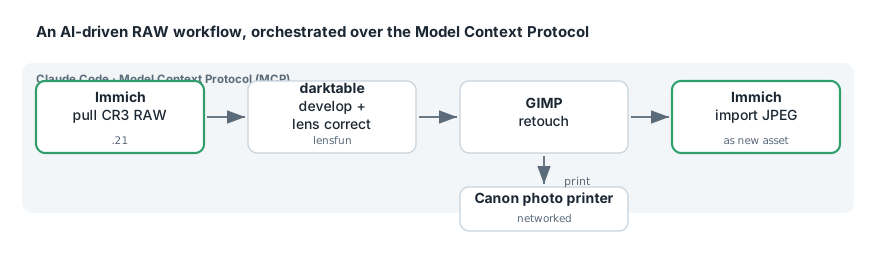
So I built it. A local, self-hosted pipeline where Claude Code can reach into my Immich library, pull original Canon CR3 RAW files, develop them in darktable with camera- and lens-specific corrections, retouch in GIMP, print on a networked Canon photo printer, and push finished JPEGs back into Immich as new assets — all driven through the Model Context Protocol (MCP).
Letting Claude Read My Firewall: an OPNsense MCP Server, and What It Found on My Network
I gave Claude a read-only window into my firewall. Not “pasted some logs into a chat” — an actual Model Context Protocol server wrapping the OPNsense API, so Claude Code could call leasesSearchLease, dnsReverseLookup, and dozens of other firewall functions on demand. Then I pointed it at a simple question — what is actually on my network, and where does it all phone home? — and got a genuinely uncomfortable answer.
This post is two things: how to stand up an OPNsense MCP server in Docker safely, and the little network-forensics session it enabled, which is the real reason to build one.
/ipad-internet off: A Claude Code Skill That Cuts One Device's Internet at the Firewall
I wanted one command — /ipad-internet off — that instantly cuts the household iPad’s internet, and /ipad-internet on to give it back. Simple ask. The interesting part is doing it correctly: instantly (no waiting on a config save), reversibly, without disturbing the LAN (AirPlay, printers, local media should all keep working), and — most importantly — in a way that can never accidentally knock a different device offline.
It ended up as a Claude Code skill backed by a careful bit of OPNsense / pf design. This post is about that design: why it uses a pf table instead of editing the config, how it survives the iPad’s shifting IP and Apple’s private Wi-Fi MAC, and the ownership guard that makes the “wrong device” failure mode structurally impossible.