Teaching an AI to Develop My RAW Photos: A Self-Hosted Linux Pipeline
I wanted to answer a specific question: could an AI agent do the boring, careful parts of my photography workflow — the parts I actually skip because they take too long?
Not “make my photos look good” in the Instagram-filter sense. I mean the tedious, correct-but-thankless work: pulling the right RAW off my server, applying the exact lens-correction data for the exact lens I used, denoising only the frames that need it, keeping the EXIF intact, filing everything under the right date, and getting a print onto photo paper without fighting a driver. The stuff a careful darkroom tech would do and a busy human never quite gets around to.
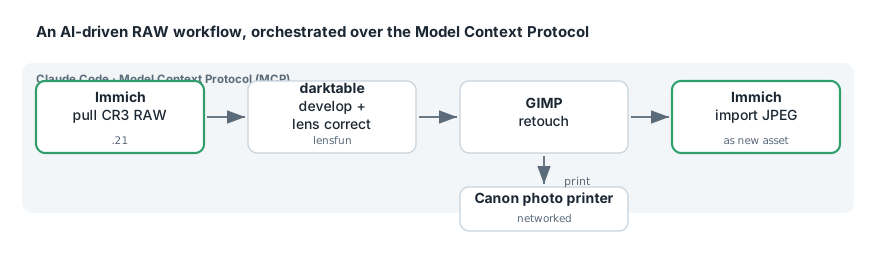
So I built it. A local, self-hosted pipeline where Claude Code can reach into my Immich library, pull original Canon CR3 RAW files, develop them in darktable with camera- and lens-specific corrections, retouch in GIMP, print on a networked Canon photo printer, and push finished JPEGs back into Immich as new assets — all driven through the Model Context Protocol (MCP).
After the Rip: Auto-Naming a Home Media Library for Jellyfin with Python, TMDB, and ffprobe
Getting video off a disc is the part everyone talks about. The part that actually eats your evenings is everything after: a folder full of title_t00.mkv, disc1/, C3_t01.mkv files that mean nothing to a media server. Jellyfin wants very specific names and folder layouts, and if you don’t give them to it, you get “Unknown Movie,” mismatched episodes, and bonus features scattered as phantom entries.
So I extended a post-processing step into a proper Python pipeline that takes whatever came out of my ripping setup and turns it into a Jellyfin-perfect library: correct movie names with IMDb IDs, TV episodes matched to the right SxxExx, extras bucketed into the folders Jellyfin recognizes, then rsynced to the NAS and scanned in — with an ntfy ping at the end. This post is about that pipeline. It is deliberately not about disc decryption — it starts the moment you have plain .mkv files.
/ipad-internet off: A Claude Code Skill That Cuts One Device's Internet at the Firewall
I wanted one command — /ipad-internet off — that instantly cuts the household iPad’s internet, and /ipad-internet on to give it back. Simple ask. The interesting part is doing it correctly: instantly (no waiting on a config save), reversibly, without disturbing the LAN (AirPlay, printers, local media should all keep working), and — most importantly — in a way that can never accidentally knock a different device offline.
It ended up as a Claude Code skill backed by a careful bit of OPNsense / pf design. This post is about that design: why it uses a pf table instead of editing the config, how it survives the iPad’s shifting IP and Apple’s private Wi-Fi MAC, and the ownership guard that makes the “wrong device” failure mode structurally impossible.